
The short answer
Your phone does not raise your blood sugar, but the habits it encourages can. Long, unbroken sitting is linked with higher blood sugar after meals, and late-night scrolling cuts into sleep, which is linked with lower insulin sensitivity the next day. The fix is not to ditch your phone but to make it work for you: a blood sugar app that matches your meter, a walk reminder after meals, a sleep mode at bedtime and a daily reminder for your morning routine with Olivaro.
“Blood sugar app” is a search Americans type all year long, and it makes sense: most of us spend hours a day on our phones. But the phone is double-edged. The same device that can log your readings and remind you to walk is also the one keeping you on the couch at 11 p.m. This guide looks at what the evidence says about screens, sitting and sleep, which apps actually help, and a short setup you can do today.
How screens and phones connect to blood sugar
There is no evidence that a screen itself changes your glucose. The connection runs through three everyday habits that phones make easier:
- Sitting longer — scrolling after dinner keeps you still during the exact hour when blood sugar peaks. A 2022 review in Sports Medicine found that breaking up long sitting with light walking lowered after-meal glucose compared with staying seated.
- Sleeping less — screens in bed push bedtime later. The CDC recommends 7 or more hours of sleep for adults and links short sleep with a higher risk of type 2 diabetes. Our guide on high morning blood sugar explains why the night matters for your fasting number.
- Light at night — bright light in the evening delays melatonin, the hormone that tells your body it is night. In a small 2022 study in PNAS, healthy adults who slept one night with moderate room light showed higher insulin resistance the next morning than after a night in the dark.
- Mindless snacking — eating in front of a screen makes it easier to lose track of how much you ate, especially late in the evening.
The encouraging part: each of these has a simple phone-based fix.
Blood sugar apps: which kinds are worth using
| Type of app | What it does | Good for | Keep in mind |
|---|---|---|---|
| Meter companion app | Syncs readings from a Bluetooth glucose meter | Anyone who checks with fingersticks | Use the app made for your meter |
| CGM app | Shows readings from a continuous glucose monitor sensor | People using a prescription or over-the-counter CGM | The sensor measures; the phone only displays |
| Built-in health app | Logs steps, sleep, weight and notes in one place | Spotting patterns over weeks | Free and already on your phone |
| Food and activity log | Tracks meals, walks and how you feel | Seeing which meals cause the biggest slumps | Pick one you will open daily |
| Reminders and alarms | Walk, water, bedtime and routine prompts | Turning good intentions into habits | The most underrated tool of all |
One warning matters more than any feature list: no phone, smartwatch or ring can measure blood sugar on its own. The FDA has cautioned against devices that claim to read glucose without piercing the skin. Our fact-check on blood sugar monitors without finger pricks shows how to tell real devices from fakes.
How to use apps without obsessing
More data is not always better. Checking your numbers every hour can turn into worry rather than progress. A few healthy rules:
- Decide when you will lookFor example, fasting in the morning and 2 hours after your biggest meal on a few days a week, or as your doctor suggests.
- Look for patterns, not single numbersOne high reading after a birthday dinner means little. The same high every morning is worth discussing.
- Review once a weekTen minutes on Sunday beats a hundred glances a day. Our article on where to start with blood sugar helps you turn patterns into one clear next step.
- Share with your doctorExport or screenshot a two-week summary before your next appointment.
Configure your phone today: a 10-minute checklist
- After-meal walk alarm — a repeating alarm 15 minutes after your usual dinner time labeled “10-minute walk.”
- Sitting breaks — a reminder every 45 to 60 minutes during work hours to stand and walk for 2 to 5 minutes. Many smartwatches have a built-in stand or move reminder.
- Sleep or bedtime mode — both iPhone and Android phones have a scheduled sleep mode that silences notifications and dims the screen. Set it to start 30 to 60 minutes before bed.
- Warm screen at night — turn on the night light or warm-color setting for the evening hours.
- Charge outside the bedroom — or at least across the room, so the phone is not the last and first thing you see.
- One log — choose one place for readings, walks and notes, and delete the rest.
- Morning routine reminder — a daily alarm for your water, breakfast and supplement routine, so nothing gets skipped on busy days.
When the phone should stay away
Some moments are better without a screen: the first minutes after waking, meals (eating slowly helps you notice fullness), the after-dinner walk and the last half hour before bed. If you find yourself checking glucose numbers constantly and feeling anxious, that is a good sign to step back and talk to your doctor about a simpler testing plan. Stress hormones raise blood sugar too, as our guide on stress and blood sugar explains.
Our recommendation: Olivaro
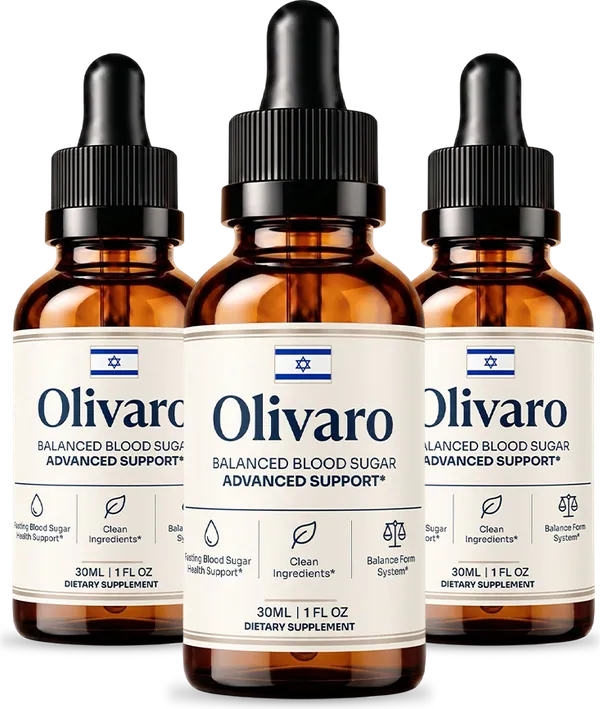
The best phone setup still needs a routine worth reminding you about. Olivaro is the option we recommend to anchor that routine: one morning dropper designed to support healthy insulin function, balanced blood sugar levels and carbohydrate metabolism, with one simple reminder on your phone to keep it daily.
- A broad botanical blend — gymnema, green tea leaf, Panax ginseng, astragalus, maca and African mango seed, with chromium picolinate.
- Adaptogens for stressful days — eleuthero and ginseng, plus GABA and L-tryptophan.
- Easy to keep — a 30 ml (1 fl oz) dropper bottle, one or two droppers in the morning.
- No sugar added — a glycerin base sweetened with stevia and xylitol.
- Zero risk — every order is backed by a 60-day money-back guarantee, with a one-time payment.
Packages on the official site: 6 bottles at $49 per bottle ($294) is the best offer, 3 bottles at $69 per bottle ($207) is the most popular, and 2 bottles are $79 per bottle ($158). The 3- and 6-bottle packages ship free. If you take medication for blood sugar, Olivaro works alongside the care you already follow; show the label to your doctor before starting.
Set the reminder, take the walk, protect your sleep. Get Olivaro from the official site and make your phone part of the solution, or read our full review first.
Sources: Buffey AJ et al., “The Acute Effects of Interrupting Prolonged Sitting Time in Adults with Standing and Light-Intensity Walking on Biomarkers of Cardiometabolic Health,” Sports Medicine, 2022; Mason IC et al., “Light exposure during sleep impairs cardiometabolic function,” PNAS, 2022; CDC, “About Sleep” and “Sleep and Chronic Disease”; US Food and Drug Administration, safety communication on smartwatches and smart rings that claim to measure blood glucose without piercing the skin (2024). This guide is general information, not medical advice.
Frequently asked questions
What is the best blood sugar app?
There is no single best app; the right one depends on what you need. If you use a glucose meter or a continuous glucose monitor, start with the companion app made for your device, because it syncs readings automatically. For logging meals, activity and notes, your phone’s built-in health app or any simple log you will actually open every day works well. Share the data with your doctor rather than diagnosing yourself from an app.
Can my phone check my blood sugar?
No. A phone or a smartwatch on its own cannot measure blood sugar. The FDA has warned against smartwatches and rings that claim to measure glucose without piercing the skin. Real readings come from a fingerstick meter or a continuous glucose monitor with a small sensor; the phone only displays and stores the data.
Does screen time raise blood sugar?
Screens themselves do not raise blood sugar, but the habits around them can. Long periods of sitting are linked with higher blood sugar after meals, and late-night screen use can shorten and disturb sleep, which is linked with lower insulin sensitivity the next day. Breaking up sitting and putting the phone away before bed address both.
Does sleeping with the light on affect blood sugar?
A small 2022 study from Northwestern University, published in PNAS, found that healthy adults who slept one night with moderate room light had higher insulin resistance the next morning than when they slept in the dark. Keeping the bedroom dark and the phone screen off at night is a simple step.
How often should I get up when sitting to help my blood sugar?
Research on breaking up sitting suggests that light walking for 2 to 5 minutes every 30 to 60 minutes helps after-meal blood sugar compared with sitting still. A repeating reminder on your phone or watch makes this easy.
Can I set a reminder for Olivaro on my phone?
Yes, and it is one of the easiest ways to stay consistent. Set a daily morning alarm or a medication-style reminder in your health app labeled with your Olivaro routine. If you take blood sugar medication, Olivaro works alongside the care you already follow; show the label to your doctor first.
This article is for general information only and is not medical advice. Dietary supplements are not intended to diagnose, treat, cure or prevent any disease. Talk to your doctor before changing your diet, exercise or supplements, especially if you take medication.